Create Lessons Faster.
Stay Aligned. Teach With Confidence.
Start from a PDF or let Flow Build research the topic and draft the lesson for you — either way you get a complete, standards-aligned lesson with slides, quiz, assignment, and games, ready to publish to Canvas or Google Classroom in under 2 minutes.

Analytics
Live student mastery, game scores, and quiz results — all in one dashboard.
Standards-Driven & Tracked
Every lesson, game, and quiz ties back to a tracked standard — mastery you can prove.
One Tool for All Your Lesson Needs
Build from a PDF or from AI research, engage, analyze, and share — all without leaving LessonSaver.
How It Works
From Idea to Published in 4 Steps
Pick your path → AI builds → you tweak → one click to your LMS.
Pick Your Path
Upload a lesson PDF, or let Flow Build research the topic and draft it from scratch — both paths take seconds.
AI Fills Everything
Objectives, intro, quick checks, summary, slides, quiz, games — generated instantly, tied to your standards.
Review & Tweak
Edit any section, add videos, embeds, or your own media. You stay in control of what students see.
Publish to LMS
Copy the generated HTML and paste it into Canvas or Google Classroom — your lesson is live in seconds.
6–8 hrs
Traditional prep
→
< 2 min
With LessonSaver™
280+ hours saved per teacher, per year.
AI builds the draft — you review, tweak, and publish.
Built by AI — Not Just Assisted
One PDF In. A Whole Lesson Out.
This is a real AI build — the entire lesson below was generated from the source PDF on the left.
ecology_unit_ch3.pdf · 14 pages
Ecosystems & Energy Flow
Grade 6 · 45 min · Standards-aligned
AI builds the draft — you review, tweak, and publish. Every section is editable before it reaches your LMS.
A Real Lesson
Peek at a Finished Lesson
This is what your students see inside Canvas — header, objectives, learning steps, and more. Scroll the preview to explore.
IT Fundamentals · High School · 60 min
Module 2 · Lesson 2A — Network Types & Topologies
How Networks Shape Our World
Introduction
Every device you use — your phone, laptop, smart TV — relies on a network to communicate. In this lesson, we'll explore the types of networks that power modern life and how they're physically connected.
🎯 Learning Objectives
- →Identify and compare LAN, WAN, MAN, and PAN network types
- →Explain the purpose of common network topologies
- →Describe real-world scenarios where each network type is used
✅ Success Criteria
- ✓I can define LAN, WAN, MAN, and PAN with examples
- ✓I can draw and label at least 3 network topologies
- ✓I can explain why topology choice matters for performance
🔍 Today's Main Focus
Today we zoom in on how devices connect — from the Wi-Fi in your home to the global internet backbone — and why the shape of a network matters as much as its speed.
📚 Independent Learning Steps
Listen to an engaging podcast walkthrough covering LAN, WAN, and MAN network types with real-world examples from industry professionals.
Watch an animated explainer on network topologies — star, bus, ring, and mesh — and learn which topology powers enterprise networks.
Work through an interactive slideshow with diagrams showing how each topology functions and its trade-offs.
Sign in to see the full lesson
Quick checks, summary, assignment, and more — all free.
No credit card required
See the Games & Analytics Dashboard
Explore a fully interactive demo of our real-time game console, student leaderboards, mastery tracking, and concept-level analytics — no login required.
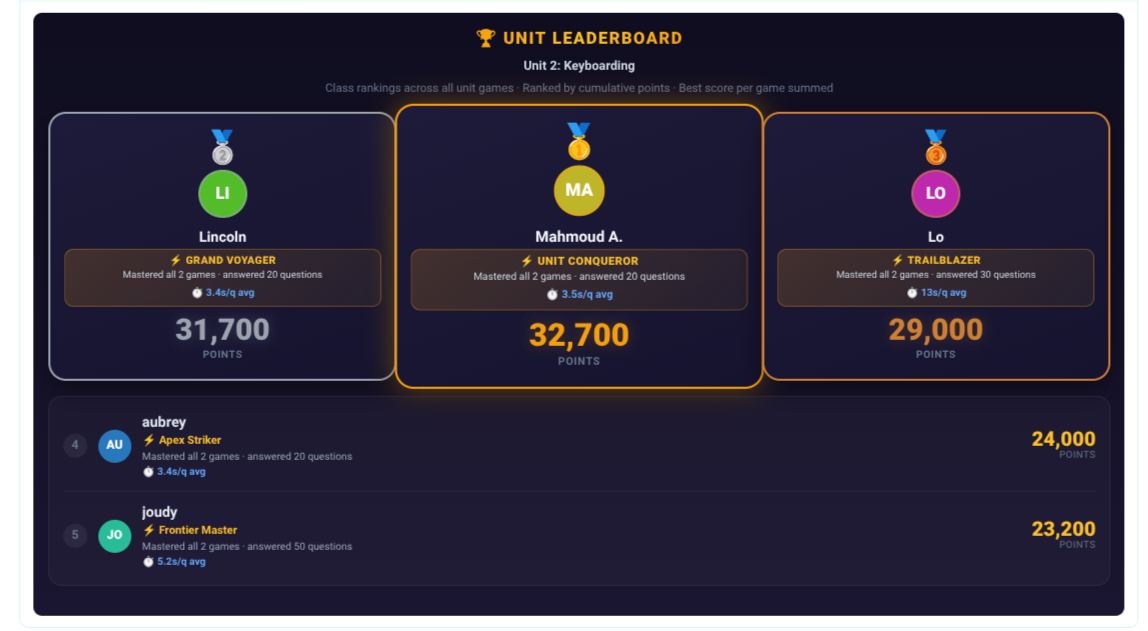
Live Leaderboards, 100% Standards-Driven
Students climb the ranking based on their game review score — and every point ties back to a tracked standard. Teachers get friendly competition that actually moves mastery, not just noise.
- Unit & lesson leaderboards update in real time as students play.
- Every score is standard-aligned — ranking reflects real mastery, not just speed.
- Spot reteach targets instantly — see which standards the class is still climbing on.
See Your School's Live Pulse
Stop waiting for semester-old reports. Watch student mastery data flow in real time — straight from the desk to your dashboard.
Pricing
Start Free. Upgrade When It's Obvious.
Free forever with 3 of everything. Pro unlocks unlimited AI lesson building from $39/mo — and with Payday Delay, you can start Pro now and pay when your check lands.
FAQ
Questions, Answered
Ready to Save Hours Every Week?
Join teachers delivering polished, AI-powered lessons to their LMS — in minutes, not hours.